
What Is a Laptop CPU and GPU? A Simple Guide

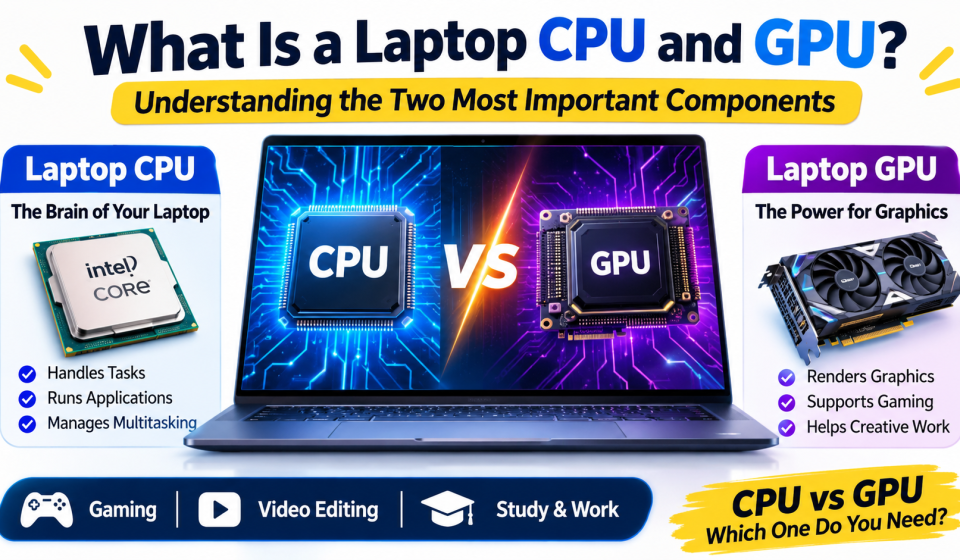
What Is a Laptop CPU and GPU? Understanding the Two Most Important Components
When purchasing a new laptop, you’ll often notice two key terms, CPU & GPU. These each help to determine the performance of a laptop. While some laptops will be designed for general use, others are designed for gaming, video editing, programming, and professional use.
Knowing the differences between a laptop CPU and GPU can help you select the right laptop for your needs, helping you avoid paying for any extra features that you don’t need.
Throughout this guide we’re going to explain what a CPU & GPU are on a laptop, how they work and why they’re important.
What Is a Laptop CPU?
CPU stands for Central Processing Unit. It is often called the brain of a laptop because it handles instructions and performs the calculations needed to run programs.
Whenever you open a browser, write a document, install software, or switch between applications, the CPU helps process those tasks.
A laptop CPU is responsible for activities such as:
- Running the operating system.
- Opening and managing applications.
- Processing instructions and calculations.
- Supporting multitasking.
- Managing communication between different hardware components.
How Does a Laptop CPU Work?
A CPU receives instructions from software, processes them, and produces results. It performs many small operations extremely quickly, allowing your laptop to respond to your actions.
For example, when you open a web browser, the CPU helps load the application, process its instructions, and manage different activities running in the background.
Important Features of a Laptop CPU
Not every processor performs the same way. Here are some important features to understand before buying a laptop.
1. CPU Cores
A core is an individual processing unit inside a CPU. Multiple cores allow a processor to handle different tasks more efficiently.
For example, a laptop with more CPU cores may perform better when running several demanding applications at once. However, the number of cores alone does not determine performance.
2. Clock Speed
Clock speed is usually measured in GHz (gigahertz). It indicates how many clock cycles a processor can perform per second.
A higher clock speed can help with certain tasks, but processor architecture, cooling, power limits, and other factors also affect real-world performance.
3. Cache Memory
Cache is a small amount of high-speed memory inside or close to the CPU. It stores frequently needed data so the processor can access it quickly.
4. Power Efficiency
Laptop processors must balance performance and battery consumption. An efficient CPU can help a laptop deliver good performance without using unnecessary power.
Popular Laptop CPU Brands
Two major processor brands are commonly found in laptops:
- Intel: Known for its Core and Core Ultra processor families.
- AMD: Known for its Ryzen processor families.
Both brands offer processors for everyday computing, office work, gaming, and professional applications. The exact model and generation matter more than the brand name alone.
What Is a GPU and Why Does It Matter?
GPU stands for Graphics Processing Unit. It is a processor designed to handle graphics-related calculations and many operations that can be processed in parallel.
A GPU helps display images, videos, animations, and visual effects on your laptop screen. It is especially important for gaming, 3D design, video editing, and other graphics-intensive tasks.
A GPU is responsible for tasks such as:
- Rendering images and animations.
- Processing graphics in video games.
- Supporting video editing and visual effects.
- Helping with 3D modelling and rendering.
- Accelerating certain creative and computing applications.
How Does a Laptop GPU Work?
A GPU processes many smaller calculations simultaneously. This makes it useful for tasks that involve large amounts of visual data.
For example, when you play a video game, the GPU helps render the environment, characters, lighting, shadows, and other visual elements. It works with the CPU to create a smooth gaming experience.
Types of Laptop GPUs
Most laptops use one of two main types of graphics solutions.
1. Integrated GPU
An integrated GPU is built into the CPU or processor package and generally shares system memory.
It is suitable for:
- Watching videos and streaming.
- Browsing the internet.
- Online classes and office applications.
- Basic photo editing.
- Casual gaming and everyday graphics tasks.
Integrated graphics are often a practical choice for students and users who do not need demanding graphics performance.
2. Dedicated GPU
A dedicated GPU is a separate graphics processor with its own graphics memory, commonly called VRAM.
It is designed for more demanding graphics workloads, such as:
- Modern PC gaming.
- Professional video editing.
- 3D modelling and rendering.
- Advanced graphic design.
- Certain AI and computing workloads.
Dedicated graphics can provide more performance, but they may also increase laptop cost, power consumption, and heat.
Laptop CPU vs GPU: What Is the Difference?
Although both components help your laptop run smoothly, their main responsibilities are different.
| Feature | CPU | GPU |
|---|---|---|
| Full Form | Central Processing Unit | Graphics Processing Unit |
| Main Job | General processing | Graphics and parallel processing |
| Best For | Applications and multitasking | Gaming and visual workloads |
| Processing Style | Handles different types of instructions | Handles many similar calculations in parallel |
| Common Types | Intel Core, AMD Ryzen | Integrated and dedicated graphics |
| Important For | Overall system performance | Graphics performance |
In simple terms, the CPU handles general instructions, while the GPU focuses on graphics and other tasks that benefit from parallel processing.
Why Do You Need Both CPU and GPU?
A laptop needs both processing and graphics capabilities to deliver a complete computing experience.
For example, when editing a video, the CPU can manage application instructions and different editing operations, while the GPU may accelerate effects, playback, and rendering.
During gaming, the CPU handles game logic and other calculations, while the GPU renders the graphics.
They work together, so choosing a laptop with a powerful GPU but a weak CPU—or the opposite—may not give you the performance you expect.
Which Laptop CPU and GPU Do You Need?
The best combination depends on what you plan to do with your laptop.
| User Type | CPU Requirement | GPU Requirement |
|---|---|---|
| Students | Modern entry-level or mid-range CPU | Integrated GPU is often enough |
| Office Work | Modern efficient CPU | Integrated GPU |
| Browsing and Streaming | Entry-level or mid-range CPU | Integrated GPU |
| Graphic Design | Mid-range or powerful CPU | Depends on the software and workload |
| Video Editing | Powerful multi-core CPU | Dedicated GPU may help |
| Gaming | Modern high-performance CPU | Dedicated GPU recommended |
| 3D Rendering | Powerful CPU | Powerful dedicated GPU |
Always check the requirements of the software you plan to use. Some creative applications depend heavily on the CPU, while others benefit more from a dedicated GPU.
Can a Laptop Work Without a Dedicated GPU?
Yes. A laptop does not always need a dedicated GPU.
Many modern processors include integrated graphics that can handle everyday tasks, video playback, basic design work, and some lightweight games.
If you mainly use your laptop for studying, browsing, writing, presentations, and office applications, integrated graphics may be enough.
However, if you regularly play demanding games or work with complex 3D projects, a dedicated GPU can make a noticeable difference.
5 Things to Check Before Buying a Laptop
Before choosing a laptop, do not focus only on the CPU or GPU brand. Check these important details:
- Exact Processor Model: Check the full CPU model and generation instead of choosing only by the Intel or AMD name.
- Graphics Type: Find out whether the laptop uses integrated or dedicated graphics.
- RAM: Make sure the laptop has enough memory for your applications and multitasking needs.
- Cooling System: Good cooling helps maintain performance during demanding tasks.
- Storage: An SSD can improve startup times and application loading compared with a traditional hard drive.
Also check the laptop’s display, battery life, upgrade options, warranty, and overall price before making a decision.
Frequently Asked Questions (FAQs)
1. What is a laptop CPU used for?
A laptop CPU processes instructions, runs applications, manages multitasking, and performs general computing operations.
2. What does a GPU do in a laptop?
A GPU handles graphics processing, including images, videos, animations, gaming visuals, and certain professional workloads.
3. Is a GPU more important than a CPU?
Neither is always more important. A CPU is essential for general computing, while a GPU becomes more important for gaming, 3D work, and graphics-intensive applications.
4. Is an integrated GPU good enough for students?
For common student activities such as online classes, browsing, presentations, and document editing, integrated graphics are usually sufficient.
5. Can I upgrade my laptop CPU or GPU?
Most modern laptops have CPUs and GPUs soldered to the motherboard, which makes upgrading them difficult or impossible. Check the specific laptop model before buying if upgradeability matters to you.
6. Does more CPU cores always mean better performance?
No. Core count is only one factor. Architecture, clock speed, power limits, cooling, and software optimization also affect performance.
Final Thoughts
The CPU and GPU are two of the most important parts of a laptop. However, they have different functions. The CPU is used for general computing while the GPU handles graphical processing.
If you’re using the laptop for studying, browsing, and office work, then having a modern CPU with inbuilt graphics will be sufficient. But if you’re looking for a laptop for gaming, advanced editing, or 3D, then you may want to upgrade to a powerful CPU and a suitable dedicated GPU.
Sometimes the most intelligent decision isn’t the most expensive option. Choosing the laptop that has the right balance between performance, features, and price for your needs is the most intelligent decision.